How to Choose Smart Office Solutions for Your Business

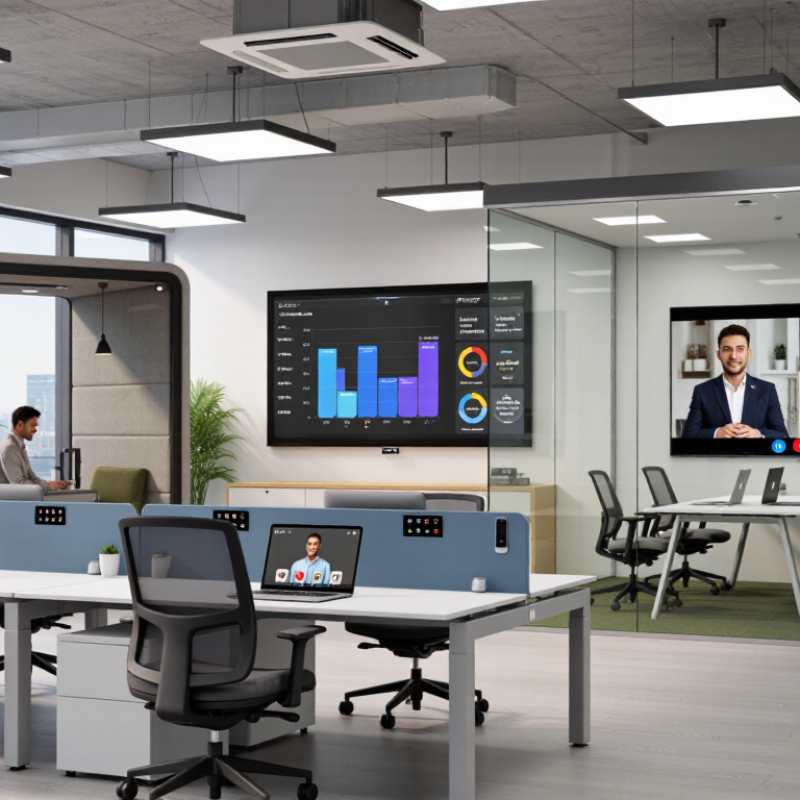
Choosing smart office solutions is less about filling a workplace with sensors than solving everyday problems. Employees need rooms that are easy to book, reliable video calls, comfortable lighting, and spaces for focused work. Yet technology alone cannot fix poor planning. A dashboard may look impressive while staff still search for an empty meeting room.

The need is measurable. Microsoft’s 2023 Work Trend Index found that 68% of surveyed employees lacked enough uninterrupted focus time, while 60% said they lacked the right tools to do their work. These findings point to practical questions: Can teams find quiet space? Do room systems work consistently? Can staff control temperature and lighting without delays? Energy performance deserves attention, too. The International Energy Agency’s 2023 Global Status Report for Buildings and Construction estimates that buildings account for about 30% of global energy consumption. That figure covers buildings broadly, not offices alone, but it shows why occupancy data and efficient controls matter.

A sound selection process connects each proposed feature to a clear business need. Compare integration with existing systems, privacy safeguards, accessibility, maintenance demands, and measurable outcomes. Start small. A pilot on one floor can reveal whether occupancy sensors improve space use or simply create confusing data. Results may be mixed, and that is useful. The best smart office solutions support employees, reduce avoidable waste, and remain dependable after the launch presentation ends.
How to Choose Smart Office Solutions for Your Business

Define Your Business Needs and Smart Office Goals

Before buying sensors, automated lighting, or room-booking tools, define the problem each one should solve. Ask staff where delays happen: Is a meeting room booked but empty? Are video calls failing in a particular corner? Do lights stay on after everyone leaves? Walk the office during busy and quiet hours, and record what you observe. Small details matter.

Set targets you can measure, such as fewer unused room bookings, faster equipment setup, or lower after-hours energy use. The UNEP 2024 Global Status Report for Buildings and Construction estimates that buildings and construction accounted for 32% of global energy demand and 34% of energy-related CO₂ emissions in 2023. That makes energy a practical goal, not just a technical feature. Still, a sensor does not guarantee savings. Staff habits and poor settings can undo the benefit.

Use a short pilot before expanding. Track room use, energy bills, and staff feedback for several weeks, then compare results with your baseline. The International Energy Agency’s 2023 Buildings report also highlights the sector’s substantial energy use and emissions. Protect privacy, too: collect only data needed for a clear purpose, and explain what is measured. This part is easy to overlook. Your targets may need revising once the real office patterns appear.

Assess Core Technologies and Integration Requirements

A smart office should solve specific workplace problems, not add screens and sensors for their own sake. Assess the core technologies your staff will use each day: room booking, occupancy sensing, video meetings, lighting, and environmental controls. A room that appears free on a booking panel but remains locked is a small failure with a real cost. Small details matter.

Map how these tools need to share information. Check whether room calendars, staff identity systems, and building controls can connect through supported interfaces. Confirm who manages user permissions, software updates, and access to usage data. Ask what happens when the network drops or a sensor sends inaccurate readings. A system that works only with one fixed setup may limit future changes. Integration is not just a technical checkbox; it affects support workload and daily routines.

Test a small area before wider installation. Watch how people actually book a room, join a meeting, and adjust the temperature. Note delays, confusing prompts, and manual workarounds. Compare those observations with the supplier’s documented requirements, and involve IT and facilities teams in the review. I would not assume a polished demonstration reflects a busy Monday morning. That can fail. Some needs may also be unclear until staff use the system, so leave room to revise the plan.

How to Choose Smart Office Solutions for Your Business — Assess Core Technologies and Integration Requirements

Solution Area Core Technologies Integration Requirements Infrastructure to Assess Security and Privacy Checks Selection Questions
Room booking and space management Cloud or on-premises booking software, room displays, occupancy sensors, and calendar connections. Check calendar-service support, identity-provider compatibility, and available APIs or standard connectors. Confirm how room resources and user permissions are synchronized. Reliable network access at meeting spaces; power or Power over Ethernet (PoE) for compatible displays and sensors; clear room naming and resource ownership. Review access controls, retention of booking and occupancy data, encryption, and whether sensor data can be configured to avoid identifying individuals. Can employees reserve rooms using their existing calendars? Can the system release unused bookings based on approved occupancy rules?
Video conferencing and meeting rooms Room cameras, microphones, speakers, displays, conferencing software, and session initiation protocol (SIP) or web-based meeting connections. Verify compatibility with existing meeting services, room calendars, guest access, and device-management tools. Test joining meetings across different organizations. Assess bandwidth, Wi-Fi coverage, wired network ports, acoustics, display connections, and PoE availability where supported. Prioritize wired connections for fixed room equipment when practical. Check meeting access controls, software update policies, encryption capabilities, guest permissions, and any recording or transcription settings. Can users start and join meetings consistently? Are room devices manageable and updateable without repeated manual setup?
Building controls and energy management Heating, ventilation and air conditioning controls; lighting controls; meters; sensors; and building-management platforms. Identify supported protocols, which may include BACnet for building automation or MQTT for message-based device communication. Confirm gateway needs and responsibility for integration and commissioning. Review controller age, wiring, network segmentation, sensor placement, local operating requirements, and whether controls must continue working during an internet outage. Separate building-control networks from general office networks where appropriate. Review remote access, supplier access, authentication, patching, and change-management procedures. Can the solution work with existing controllers? Are energy and comfort data available in a format facilities teams can use?
Occupancy and environmental sensing People-counting or presence sensors and sensors for measures such as temperature, humidity, carbon dioxide, and light levels. Confirm connectivity and data formats, gateway requirements, dashboard access, and whether readings can be exported or sent to room-booking and building-control systems. Check sensor range, mounting locations, battery or PoE needs, wireless coverage, calibration, and maintenance access. Match sensor type to the measurement required. Prefer data collection that is limited to a stated operational purpose. Determine whether sensors capture images or personally identifiable information, and set retention and access rules accordingly. What decision will each sensor reading support? Can the business collect the needed insight without collecting unnecessary personal data?
Workplace access and visitor management Electronic access readers, credentials, door controllers, visitor registration, and identity-management systems. Confirm links to staff directories, identity providers, and visitor workflows. Establish how access is granted, changed, and revoked, including for contractors and departing employees. Assess door hardware, controller capacity, power backup, network availability, and procedures for emergency egress. Keep life-safety requirements separate from convenience features. Use role-based permissions, audit logs, secure credential handling, and defined retention periods for visitor records. Review local privacy and safety obligations. Can access permissions be managed centrally? What happens to door operation during a network or power interruption?
Unified communications and workplace alerts Voice and messaging services, softphones, desk phones, public-address systems, and notification tools. Check directory synchronization, single sign-on, number or extension planning, emergency-calling support, and connections to existing paging or alert systems. Evaluate network quality of service, voice VLANs where used, PoE for compatible phones, wireless coverage, and backup power for critical communications. Review account protection, administrative permissions, call-recording settings, retention, and controls for sensitive messages. Does the solution support everyday communication as well as emergency procedures? Can staff use it across office locations and devices?
Data, identity, and device management Identity and access management, single sign-on, device management, integration platforms, and reporting dashboards. Look for documented APIs, supported data formats, SAML or OpenID Connect for sign-in, and SCIM where automated user provisioning is needed. Define a system of record for users, rooms, and devices. Assess network segmentation, endpoint inventory, administrator access, integration ownership, and capacity to monitor system health and maintain connectors. Require multifactor authentication for privileged access, least-privilege permissions, encryption in transit, auditability, backup plans, and a clear vulnerability-response process. Can systems exchange the necessary data without duplicate manual entry? Who owns integrations, updates, incident response, and ongoing support?

Compare Security, Privacy, and Compliance Features

Choosing smart office solutions means checking how they protect everyday work, not just how polished the dashboard looks. Ask where door-access logs, meeting recordings, and device data are stored. Check who can view them and how quickly access can be removed when someone changes roles. Small details matter. A receptionist may need visitor records, while a contractor may not need access to employee schedules.

Privacy controls should be clear and practical. Look for adjustable camera and microphone permissions, visible recording indicators, and simple ways to delete data that is no longer needed. Test the settings in a real meeting room. Can staff tell when a sensor is active? If the answer is unclear, the setup may need work. I once assumed default settings were adequate; that was a poor assumption.

Compliance features should support your organization’s actual obligations, which vary by location and industry. Review audit trails, retention settings, encryption, and incident-reporting options with your IT and privacy teams. Ask for current documentation, not just sales assurances. Run a small pilot and check whether reports are understandable under time pressure. No tool makes an organization compliant by itself, and paperwork can still be confusing. Keep the evaluation honest: record gaps, assign an owner, and set a date to review them.

Evaluate Costs, Scalability, and Vendor Support

A smart office proposal should be judged by its full operating cost, not just the device price. Include installation, subscriptions, network upgrades, staff training, and eventual replacement. A low initial quote can hide recurring fees for software access or technical support. Ask vendors to itemize these costs over three to five years. Then compare the estimate with your current energy, maintenance, and administrative expenses.

Look closely at how the system handles growth. Can you add meeting rooms, sensors, or user accounts without replacing the central platform? Request a small pilot in one busy room, and note setup time, connection failures, and staff questions. Real use reveals gaps. A spreadsheet cannot.

Vendor support matters most when a room fails before an important call. Check support hours, response targets, escalation steps, and whether remote troubleshooting is included. Ask who handles software updates and security patches, and how changes are communicated. Request sample onboarding materials, not just a polished sales presentation. It is easy to overlook this. I would also ask for references from organizations with similar room counts and network conditions. Even then, no vendor can remove every disruption; leave time and budget for adjustments after installation.

How to Choose Smart Office Solutions for Your Business

Example evaluation weights for balancing cost, scalability, and vendor support.

Use these example weights as a starting point, not as market statistics. Compare total costs over the same time period, check that the solution can expand with your workplace, and confirm support hours, response targets, and service terms before choosing a vendor.

Plan Implementation, Training, and Performance Reviews

A smart-office rollout works best when it solves a visible work problem, not a vague wish for modernization. Before selecting tools, map how employees use meeting rooms, shared desks, and common equipment. Note where delays occur, such as a room showing as available while a call is already underway. Set a few measurable goals, like fewer booking conflicts or faster setup for hybrid meetings. Keep it small. A pilot on one floor can reveal wiring gaps, confusing controls, or unreliable wireless coverage.

Training should match the tasks people actually perform. Give staff short, hands-on sessions in the spaces they use, with simple instructions beside room panels and shared devices. Show how to start a meeting, adjust lighting, and report a fault. Offer a second session after employees have tried the system; real questions often emerge later. Not everyone learns at the same pace. The training plan may need changing, and that is useful feedback, not failure.

Review performance after launch and at regular intervals. Compare room-booking conflicts, help requests, system downtime, and employee feedback against the goals set during planning. Ask facilities staff what they see during busy mornings, not only what dashboards report. If people keep bypassing a feature, investigate whether it is slow, unclear, or simply unnecessary. Avoid measuring activity for its own sake; a fuller dashboard does not always mean a better workplace. Keep notes on changes and check whether they improve daily work over the following weeks.